

Voice Isolation (VIVA SDK)
Remove background voices and noise from the user's audio on your servers, so your voice AI agent hears only the main speaker.
Voice Isolation removes background voices and noise from an audio stream in real time, and keeps only the main speaker. It runs inside the VIVA SDK on your servers, on CPU, and adds about 20 ms of latency.
Put Voice Isolation first in your agent's audio pipeline, before VAD, turn detection and speech-to-text. Those models then see only the user's voice, which prevents false interruptions from background speech and improves turn detection and WER.
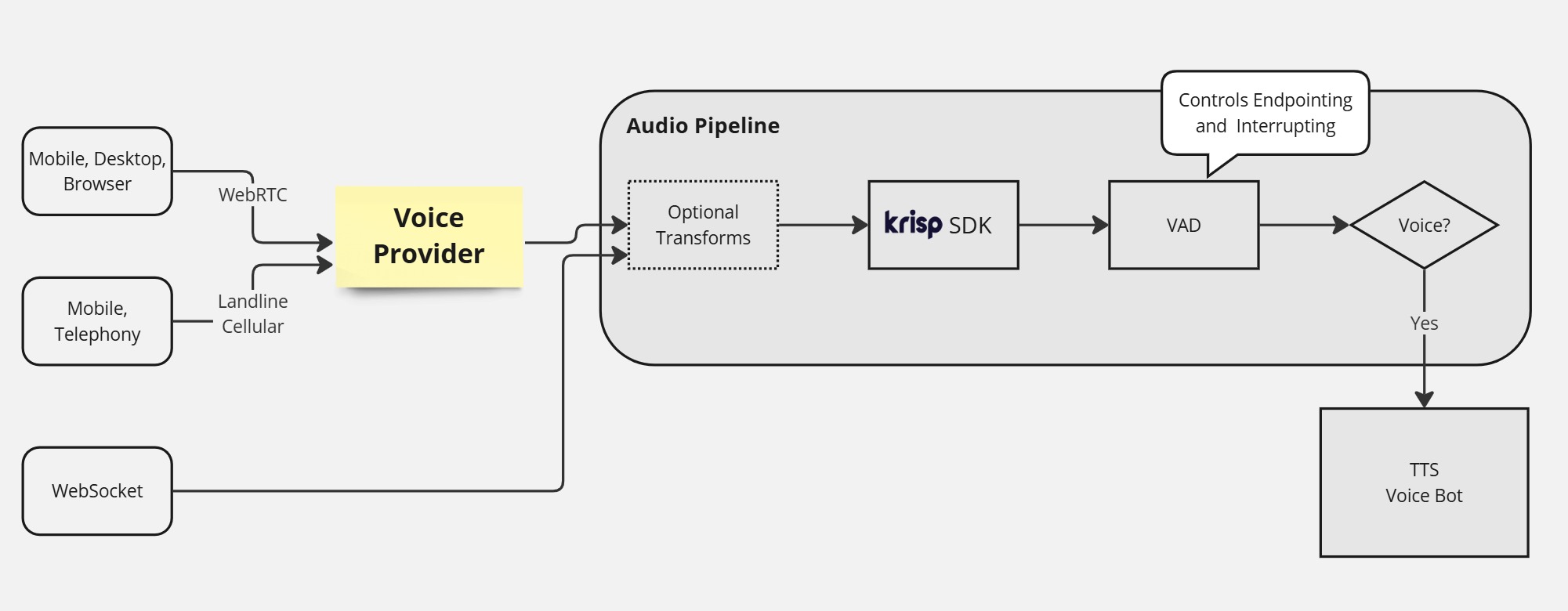
Prefer not to run a model on your servers? Voice Isolation is also available as a cloud WebSocket endpoint in the Krisp API.
When to use it
- Voice AI agents that take calls or web sessions where other people talk in the background
- Speech-to-speech models that react to every sound they hear
Krisp VIVA SDK processes multiple audio streams in real time with a single model loaded into memory, so one server can serve many concurrent calls.
Choose a model
The latest models are delivered in the krisp-viva-vi-models-v9.20.2.zip package, which you download from the Developers Portal (Voice Isolation → Downloads). Current SDK versions include the models in the SDK package. Older SDK versions may ship different models; the Downloads tab lists the models for each version.
| Model | Line-up | Best for |
|---|---|---|
krisp-viva-vi-tel-v2.5.1 | Telephony | Best noise cancellation for 8–16 kHz audio |
krisp-viva-vi-tel-lite-v2.5 | Telephony | Lowest CPU usage |
krisp-viva-vi-tel-v2.7 | Telephony | The most ASR-friendly model |
krisp-viva-vi-pro-v1 | WebRTC | Best Voice Isolation above 16 kHz |
krisp-viva-nc-ss-v1 | Smart-speaker | Best noise cancellation above 8 kHz. Audible background voices are not removed. |
Pick the line-up from the audio you receive:
| Audio stream | Telephony | WebRTC | Smart-speaker (noise only) |
|---|---|---|---|
| PSTN or landline call | Yes | No | No |
| Sample rate above 16 kHz | No | Yes | Yes |
| Sample rate 16 kHz | Yes | No | Yes |
| Sample rate 8 kHz | Yes | No | No |
| Speaker more than 1 foot (30 cm) from the mic | No | No | Yes |
The Telephony and WebRTC models (
krisp-viva-vi-*) remove background voices, so they expect the user to stay close to the microphone. Beyond about 1 foot (30 cm), the user's own voice may be suppressed. For far-field capture, such as smart speakers or conference rooms, use the smart-speaker model.
Sample rates and resampling
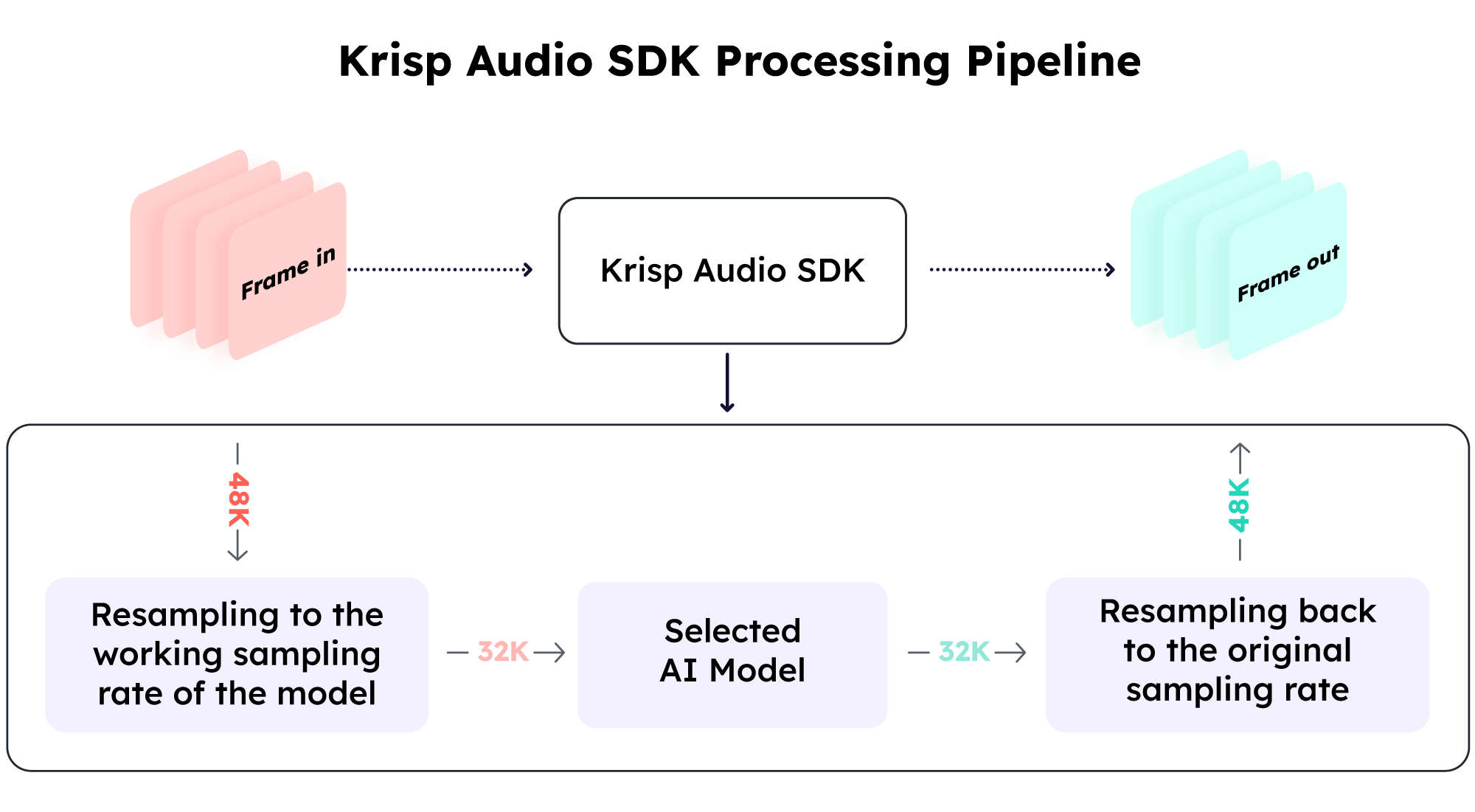
The SDK automatically resamples the input to the model's working sample rate, processes it, and resamples it back to the original rate. You configure the input and output sample rates of the stream (up to 48 kHz); the working rate depends on the model you choose.
Code
The VIVA SDK quickstart runs Voice Isolation on a WAV file in Python. For Node.js, Go, Rust and C++ samples, see Getting Started. For Pipecat, use the Pipecat integration.
Demo
Watch the demo with Daily, Pipecat and Google Gemini Live.
Troubleshooting
- The user's voice is cut or sounds quiet. The user may be too far from the microphone for a Telephony or WebRTC model. Use the smart-speaker model for far-field audio.
- Background voices are still audible. You may be using the smart-speaker model, which removes noise only. Use a Telephony or WebRTC model.
- Choppy audio or high CPU at 8–16 kHz. Try the lite telephony model.
Updated 3 days ago